

AI Agents may be a bit confusing to start with because there are so many different flavors of them on different toolchains.
If you are new to the topic, you may be wondering:
What is an Agent? How are they different from chat bots like Chat GPT / Microsoft copilot / Gemini etc?
The quick dirty answer is: They can do stuff for you apart from answering questions.
Notice the emphasis on “Do”
What stuff?
Below are some common use cases in the world of Software Engineering
They can write code for you; it could either be source code like a UI component in a React JS web app, a backend service, an automated test using playwright, Selenium, Appium or other tools
They can edit existing code for you i.e. help you with refactoring code
They can analyse your code and explain how it works; you can ask questions and use them to explain certain snippets
They can even write docs for you
They can generate diagrams
The list is quite exhaustive and increasing and thus all the hype and excitement.
Sounds pretty magical right?
You now have the capability to insert text in English and get one of these artifacts as output: code, docs, images, videos etc. And this could be a one time ask or even a system that can generalize a bit.
Like a nice person, model and tooling ask for your permissions before doing something a bit more serious, like run a command, take over your screen and do stuff for you etc.
A word of caution:
Also, just like you won’t hand over your bank account passwords to a stranger. Please don’t trust a machine with unattended access on your personal data. Do not relinquish control. Don’t be lazy; be smart and know how to work well with technology. Anything that is sensitive in nature like your secrets (passwords, passphrases), bank details etc should be guarded. If you don’t want it in public; guard it and be careful around security and access control.
With that moral obligation off my chest, let’s dive in
For this blog, I’ll assume you have a programming background or are in technology space but even if not, the general principles are still pretty intuitive to know about.
How can Agents do so much?
The lay person answer is:
We provide them relevant context and knowledge in the form of docs.
We give them clear instructions on how to go about their business with examples of what good looks like
We give them access to tools and resources using Model context protocol (MCP) servers; MCP being your glorified API (Application programming interface) for Agents to interact with your favourite tools and technologies e.g. Google docs, Figma, etc
We now teach them fine grained skills using Agent skills such has how to execute a test, how to fetch logs and make sense of the returned data etc
Agents now have larger context windows and memory capabilities as well, so they can remember stuff as they execute a given request for you.
And that’s kind of it, broadly.
Types of run modes
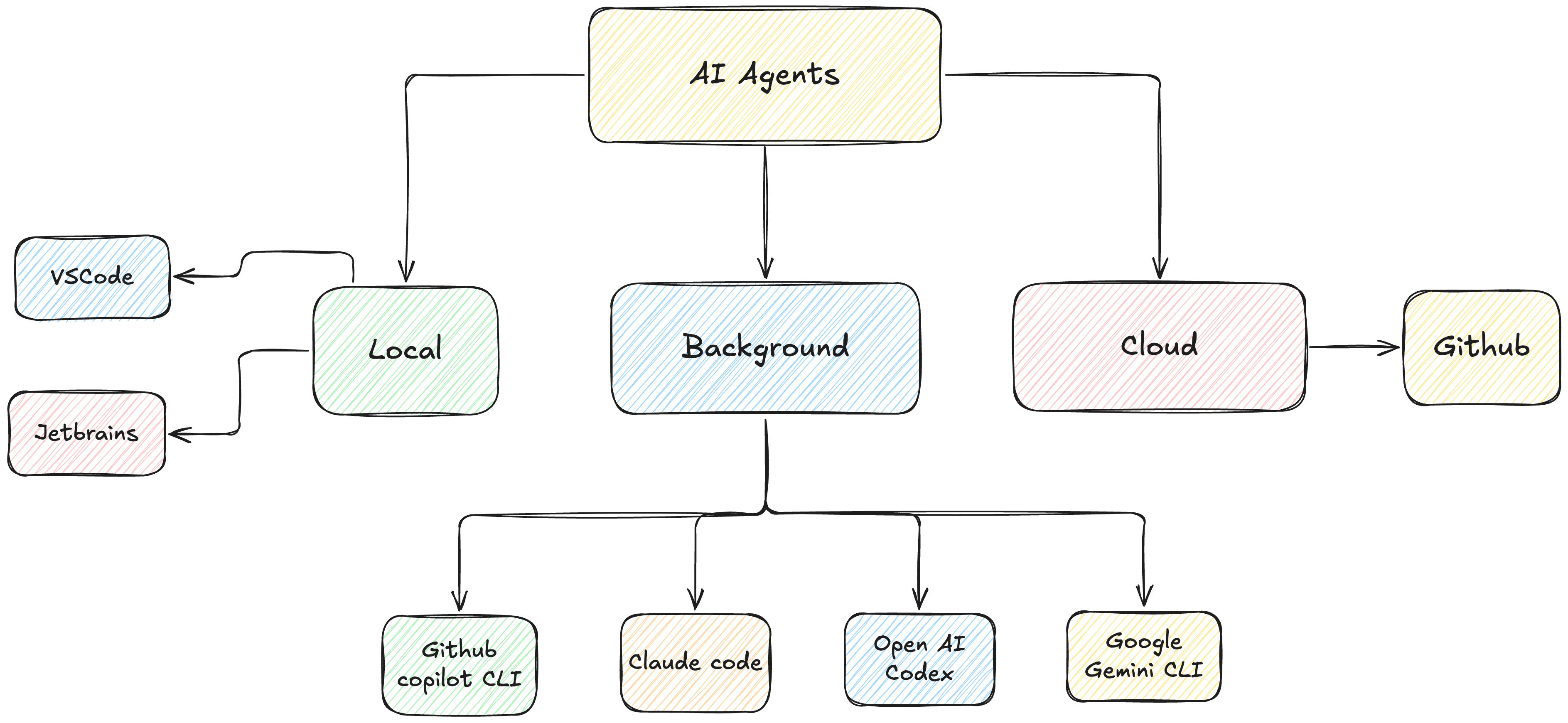
At the moment, there are 3 main types of modes in which Agents can run:
Local - on your machine, in an IDE (Integrated development environment) like VSCode, PyCharm etc
Background - on your machine, but in a terminal via CLI (Command line interface)
Cloud - on a cloud VM or container, these are generally integrated with your version control (VCS) systems like Github and can work autonomously and generate a pull request (PR) for you.