


Why MCP?
Before MCP (Model context protocol) and Agent skills were introduced as open standards, Developers had to write their own functions and prompts to provide LLM’s (Large language models) access into existing data sources and tools (such as API’s, databases, files). Many ask their models to generate APIs or scripts on demand to achieve some outcome and hope for the best. 🤞
You had to provide the right context and hope that the agent would discover the correct API (Application programming interfaces) function to pick. Also, from an LLM’s perspective, to identify the right resources to do a task, it had to load everything in its context window and then go from there. This was both inefficient and also wasteful in nature.
While this approach somehow worked with the occasional hallucination, in practice, it made it incrementally hard to produce systems that can be reused between developers and relied upon.
MCP makes an attempt at solving this problem.
Just like web frameworks and REST/gRPC helped standardize API development by providing a framework and structure for writing better API’s. MCP provides a similar structure on how an LLM could interact with different data sources and do tasks for you.
What does it mean in practice?
MCP allows LLMs to use capabilities from different systems such as,
API’s
Data sources and resources (files, databases),
Use Tools (scripts) to perform different tasks at hand.
Let’s understand this with an example.
Say,. You want your LLM to be able to provide you with helpful info about the weather before you leave your house. Assume you have an API that provides your weather information for different countries and states in the US.
How can you make it easy for your LLM to interface/use this API as you instruct it in natural english?
You can either use an MCP server exposed by this provider or create your own to get the LLM to query the weather and then return a response in natural language like English. You don’t need to know how the API is implemented under the hood, nor how the MCP server is created, but adding it to your client (IDE or a desktop/web app) provides you the capability to make use of it.
Sounds cool? Yes, it is. We’ll build this MCP server shortly for this exact use case.
Anatomy of an MCP server
What makes an MCP server?
Well, three main things really.
Tools
MCP servers expose a set of tools that your model can invoke to get a task done. What are some examples of tools? If you open tools in VS code in Github Copilot chat, you can see a few built-in tools like search files in workspace, read files in workspace, execute code and apps on your machine etc. If you can write a function to do something, it can be exposed as a tool.
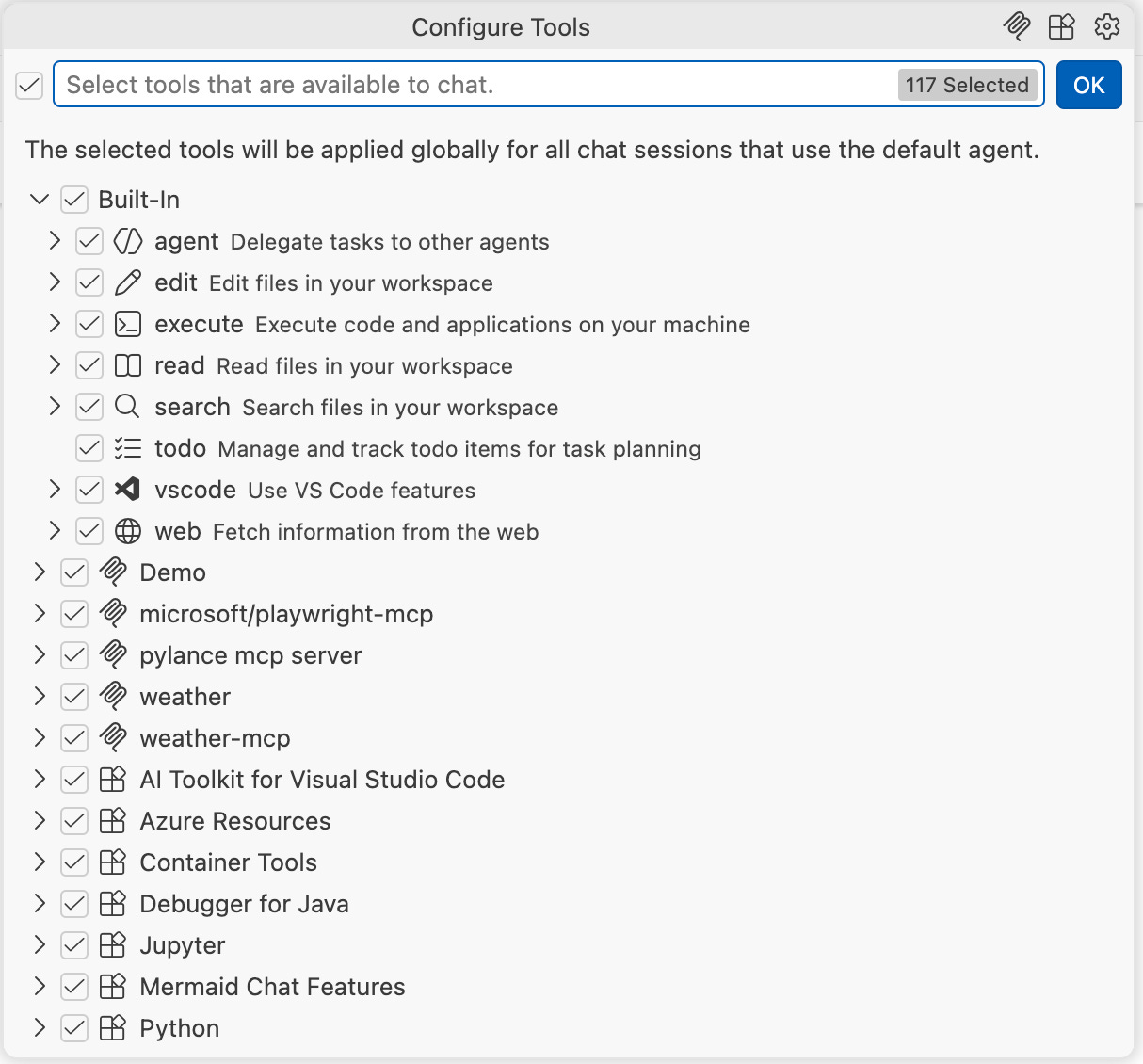
More concretely, there are 3 types of tools
Built in – built out of the box by your IDE (Integrated Development Environment)/CLI (Command line interface) Agent. For example, see GitHub Copilot in VS Code cheat sheet for list of tools
MCP tools – these are third party open source tools that are built by developers, see MCP Registry for a list of the popular ones
Extension tools – Within VS code’s context, you get a bunch of tools when you install an extension, you can also use language model tools API to provide functionality while accessing the full range of VS code extension APIs. If curious, you can read Language Model Tool API | Visual Studio Code Extension API